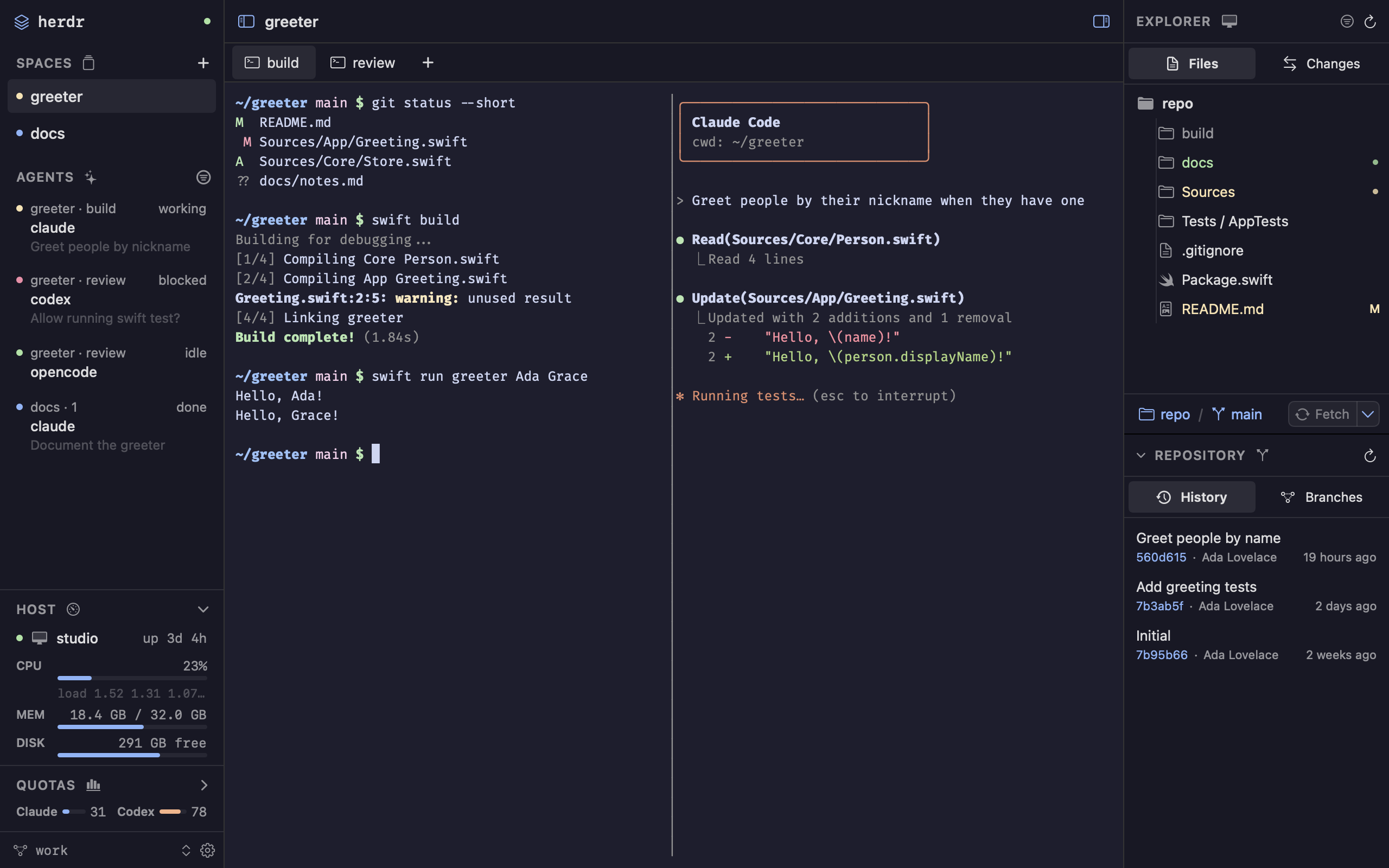
A real session with the Codex CLI, recorded in one take; sped-up parts are marked. See a full-size screenshot.
Everything around the agent, in one window
Herdr keeps owning the processes, layout and terminal state, so the same sessions stay available from the Herdr TUI. wooloo renders them natively and sends your input back.
Your agents, on the left
See every agent with its Space, task and status: working, blocked, idle or done.
Get a sound, toast or notification when an agent finishes or needs you, and an unread mark until you look.
Create, rename and close Spaces, tabs and panes from the sidebar, the menus or the command palette (⇧⌘P).
Watch the host's CPU, memory and disk, on this Mac or over SSH.
Live terminals in the middle
Herdr's panes, drawn natively with Core Text at Herdr's frame rate.
Colors, full-screen apps, inline images, mouse support and links you can ⌘-click.
Drag split borders, select and copy, paste, or drop files to type their paths.
Herdr's own key bindings, edited in the same config.toml.
Files and an editor, on the right
Browse local or SSH Spaces with Git status colors, drag and drop, and undo.
Jump with Go to File (⌘P), and search and replace across the project.
Edit with syntax highlighting, change bars and multiple cursors.
Preview Markdown with Mermaid diagrams, Jupyter notebooks, images and PDFs.
Git, below the files
Stage changes, write the message and commit from the Changes tree.
Review unified or split diffs with syntax colors.
Browse history and branches, and add worktrees. Removing one with uncommitted work is refused.
Your Mac, your data
No telemetry in the app
The wooloo app has no analytics. It talks to Herdr on your Mac, your saved SSH machines, your Git remotes and GitHub for updates. Everything else is opt-in. What the app connects to.
This website is different: it counts visits with Google Analytics.
Quotas, only if you agree
Optionally shows your Claude Code and Codex plan usage. It reads their sign-ins and calls unofficial endpoints that can change, so it stays off until you agree to a dialog that says exactly what it reads. How Quotas works.
Remote access, if you want it
Publishes this Mac's SSH server through a Cloudflare Tunnel. Off by default. wooloo checks whether SSH still accepts passwords and asks before publishing if it does, but never changes your SSH settings. Read this first.
Get started
Download the latest wooloo-<version>.zip from GitHub Releases, unzip it and drag wooloo.app to Applications in Finder.
Open it once. Then go to System Settings → Privacy & Security, click Open Anyway, confirm with Open Anyway again and enter your password or use Touch ID. Or remove the quarantine flag:
In the setup window, keep Use included Herdr, then Choose Folder… and pick a project folder. wooloo opens it with a terminal.
In that terminal, start an agent CLI you already have, such as claude or codex. It appears in the Agents list, and the files it changes show up in the explorer and the Changes tree.
Agent CLIs, their accounts and their subscriptions are separate from wooloo: install and sign in to each agent on its own. wooloo is an early preview and not notarized yet, so macOS warns on the first launch. You can also build it from source.
 wooloo